

 ShotScript
Stop client code from reaching a server module, even through a shared one
A shop keeps each player's coins in a DataStore, and Roblox lets only the server open one. In ShotScript the module that reads it can say so. From then on ShotScript Editor stops client code from reaching it, through a use line as well as a require, and it follows a module that the server and the client share to the line where the server's code comes in.
Coins live on the server
We worked in a place with a Shot folder in ReplicatedStorage. In it we made a Folder named Coins, put a ModuleScript named Coins in it and marked it as ShotScript. Its first line, system script, makes it a system of its own, and its last line hands out its module. Coins reads a player's coins from a DataStore:
system script

module Coins = {
	function Load(player : Player) : number
		local store = game:GetService("DataStoreService"):GetDataStore("Coins")
		return store:GetAsync(tostring(player.UserId)) or 0
	end
}

return Coins
Only the server may open a DataStore, so Coins is the server's. A ModuleScript says its side with an attribute: in Properties we gave Coins an attribute named RunContext, a string, set to Server.
In ServerScriptService we inserted a Boot Script named Server, which prints each player's coins when they join. Its use line names Coins by its path from game:
use game.ReplicatedStorage.Shot.Coins.Coins

local Players = game:GetService("Players")

Players.PlayerAdded:Connect(function(player : Player)
	print(player.Name, "has", Coins.Load(player), "coins")
end)
Both compile, and ShotScript Editor finds nothing to mark.
Every script has a side. Insert gives a Boot Script its side by where it goes: in ServerScriptService it runs on the server, and in StarterPlayerScripts on the client. A ModuleScript's side is its RunContext attribute. Server or Client gives it to one side, and a ModuleScript with none is shared and runs on both. Server code may use shared code and server code, client code may use shared code and client code, and shared code may use only shared code.
Its code stays on the server
Roblox copies ReplicatedStorage into every player's game, so a plain ModuleScript there would hand Coins to every player. ShotScript Editor makes a server module there a Script that runs on the server, with a ModuleScript named Public under it for server code to require. The compiled Coins says so at its top, in a comment: hidden server code: no client gets this Script's source; server code uses script.Public. The Server's use line compiled to a require of that Public:
local Coins = require(game:GetService("ReplicatedStorage").Shot.Coins.Coins.Public)The client reaches for it
Next we wanted the client to print the count too. In StarterPlayerScripts we inserted a Boot Script named Client that uses Coins directly:
use game.ReplicatedStorage.Shot.Coins.Coins

local Players = game:GetService("Players")

print("Coins:", Coins.Load(Players.LocalPlayer))
ShotScript Editor marks the use line: client code uses server Coins (ReplicatedStorage/Shot/Coins/Coins.shot). It's an error, so the editor refuses the Client until the line is fixed, and the Client errors in Play until then.
A require gets the same mark. With local Coins = require(game.ReplicatedStorage.Shot.Coins.Coins) as the first line instead, the editor says client code requires server Coins (ReplicatedStorage/Shot/Coins/Coins.shot), starting under require.
Through a module both sides share
A line like that is easy to spot. The harder case goes through a module in between. Beside Coins we made a Folder named Prices with a ModuleScript Prices in it, which starts with system script too. Prices is a shared system that tells whether a player can afford something, so it has no RunContext attribute. It asks Coins for the count:
system script

use game.ReplicatedStorage.Shot.Coins.Coins

module Prices = {
	function CanAfford(player : Player, price : number) : boolean
		return Coins.Load(player) >= price
	end
}

return Prices
The Client now uses Prices in place of Coins:
use game.ReplicatedStorage.Shot.Prices.Prices

local Players = game:GetService("Players")

print("Can afford the sword:", Prices.CanAfford(Players.LocalPlayer, 50))
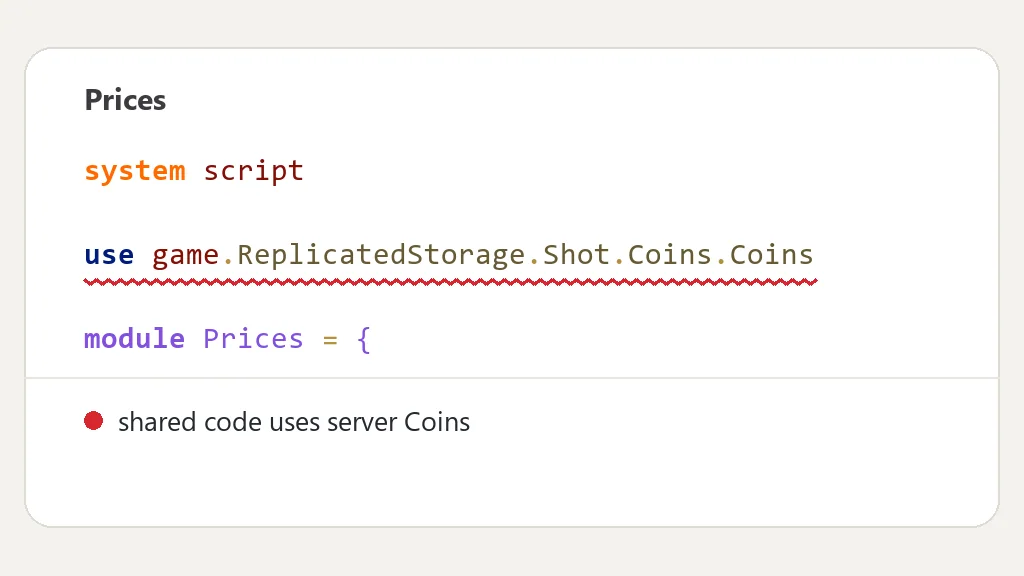
On its own the Client is fine, since client code may use a shared module. The trouble is one step further down, and that's where the editor puts it, on the use line in Prices: shared code uses server Coins (ReplicatedStorage/Shot/Coins/Coins.shot).
Shared code runs on both sides, so Prices runs on the client as well, and there it would call Coins. The mark sits in Prices itself, so it shows before any client script uses Prices. We deleted the Client, and Prices kept the same mark on the same line.
The row offers two fixes: set Prices' RunContext attribute to Server, or tag the use server. The client needs Prices, so we went another way.
Ask the server instead
The client can't read the DataStore, so it asks the server. In ReplicatedStorage we inserted a RemoteFunction named CoinsRequest. Coins answers it with Load once Start runs:
system script

module Coins = {
	function Load(player : Player) : number
		local store = game:GetService("DataStoreService"):GetDataStore("Coins")
		return store:GetAsync(tostring(player.UserId)) or 0
	end

	function Start()
		local request = game:GetService("ReplicatedStorage"):WaitForChild("CoinsRequest") :: RemoteFunction
		request.OnServerInvoke = function(player : Player) : number
			return module.Load(player)
		end
	end
}

return Coins
The Server calls Coins.Start() before it connects PlayerAdded:
use game.ReplicatedStorage.Shot.Coins.Coins

local Players = game:GetService("Players")

Coins.Start()

Players.PlayerAdded:Connect(function(player : Player)
	print(player.Name, "has", Coins.Load(player), "coins")
end)
Prices takes the count as a number and no longer uses Coins:
system script

module Prices = {
	function CanAfford(coins : number, price : number) : boolean
		return coins >= price
	end
}

return Prices
The Client asks the server for the count, then asks Prices:
use game.ReplicatedStorage.Shot.Prices.Prices

local ReplicatedStorage = game:GetService("ReplicatedStorage")
local CoinsRequest = ReplicatedStorage:WaitForChild("CoinsRequest") :: RemoteFunction

local coins = CoinsRequest:InvokeServer()
print("Can afford the sword:", Prices.CanAfford(coins, 50))
Every script compiles with nothing marked. Coins stays in ReplicatedStorage as hidden server code, the check keeps the game's own client code from calling it, and the client gets its count from the answer CoinsRequest gives.