

 ShotScript
Give a ShotScript program a page of its own
A tool that runs in a terminal is fine until you want to see what it's doing, or press a button. Since 19 October a ShotScript program can serve a web page of its own and talk to it both ways while it runs. The program sends text to every open page, the page sends text back, and that's enough for a small window with buttons.

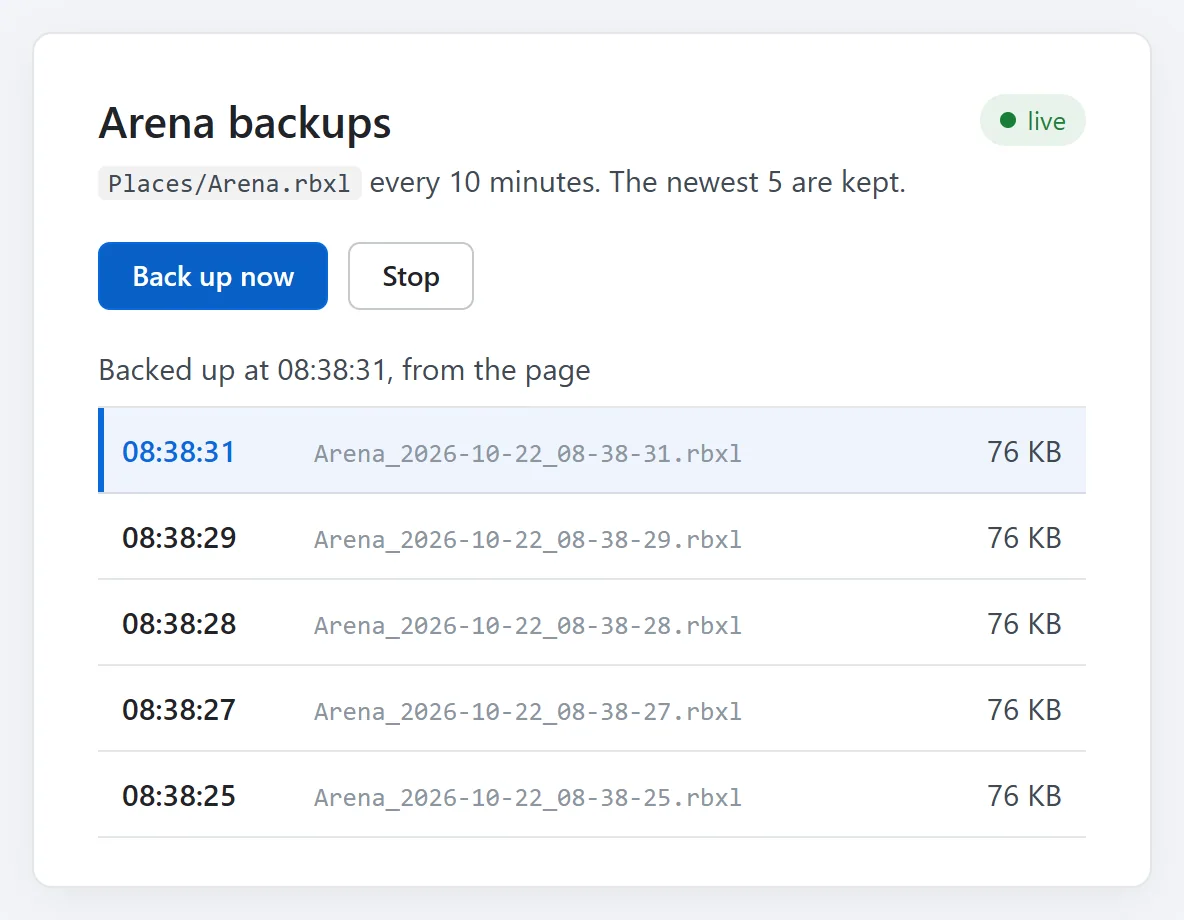
That's the page we put on a place backup. It copies the place into a Backups folder every ten minutes, Back up now makes a copy straight away (before a risky change, say), and the list updates by itself whenever something changes. It's one ShotScript file and one HTML file, and it runs on your own computer only.
The program
This is all of Main.shot, in a System project called Backup.ssp:
use FileService
use JsonService
use PageService
use TimeService

local KEEP = 5
local source = FileService:GetPathHandler("Places/Arena.rbxl")
local backups = FileService:GetPathHandler("Backups")
FileService:MakeFolderAsync("Backups")

local page = assert(PageService:ServeAsync({ Folder = "Page" }))
print("open " .. page.Url)

local function report(note: string): string
	local rows = {}
	for _, entry in assert(FileService:ListAsync("Backups")) do
		local size = FileService:SizeAsync("Backups/" .. entry.Name) or 0
		table.insert(rows, { Name = entry.Name, KB = math.round(size / 1024) })
	end
	return JsonService:Encode({ Rows = rows, Note = note })
end

local function backUp(why: string)
	local stamp = TimeService:Format(nil, "%Y-%m-%d_%H-%M-%S")
	local copy, problem = source:CopyAsync(backups, "Arena_" .. stamp .. ".rbxl")
	if not copy then
		page:Send(report("Couldn't back up: " .. tostring(problem)))
		return
	end
	print("backed up " .. copy.Path .. ", " .. why)

	local entries = assert(FileService:ListAsync("Backups"))
	for i = 1, #entries - KEEP do
		FileService:RemoveAsync("Backups/" .. entries[i].Name)
		print("deleted " .. entries[i].Name)
	end
	page:Send(report("Backed up at " .. TimeService:Format(nil, "%H:%M:%S") .. ", " .. why))
end

local timer = TimeService:Every(600, function()
	backUp("on the timer")
end)

page.Connected:Connect(function(client)
	client:Send(report("Watching Places/Arena.rbxl"))
end)

page.Message:Connect(function(_, text)
	if text == "backup" then
		backUp("from the page")
	elseif text == "stop" then
		print("stopped from the page")
		timer:Destroy()
		page:Destroy()
	end
end)
PageService:ServeAsync starts serving and hands back a Page. With Folder = "Page" it serves the files in the Page folder next to the project, index.html for the address itself. It tries port 47200 first and takes the next free one if that's busy. page.Url is the whole address to open, with a key on the end that we'll come back to.
The rest hangs off three things. page.Connected fires when a page opens the channel, and the program sends just that page the current list with client:Send. page.Message fires for each text a page sends back, which here is either "backup" or "stop". And page:Send in backUp goes to every open page at once.
Messages are plain text, so the list travels as JSON from JsonService:Encode, and the page parses it.
The page
The page's end of the channel is one script, which the program serves for you:
<script src="/shotsystem/live.js"></script>After that it takes three calls. These are the lines of our index.html that use them:
ShotLive.on((text) => {
	const data = JSON.parse(text);
	note.textContent = data.Note;
	list.replaceChildren(...Object.values(data.Rows).reverse().map(row));
});
ShotLive.onState((state) => {
	live.textContent = state === "open" ? "live" : "closed";
	live.className = "pill " + state;
});
document.getElementById("backup").onclick = () => ShotLive.send("backup");
document.getElementById("stop").onclick = () => ShotLive.send("stop");
ShotLive.on hears each text the program sends, ShotLive.send sends one back, and ShotLive.onState hears the channel open and close. The page also links /ui/common/theme.css, the stylesheet of ShotScript's own project window, and takes its blue and its greys from there.
One thing tripped us up. Before the first backup the list is an empty Luau table, and an empty table can't say whether it's a list or a map, so JSON writes it as {}. Our first page called .slice() on that and broke. Object.values reads an array and an empty object alike, so the page uses that now.
Running it
shot run Backup.sspThe program prints the page's address, and you open it in a browser on the same computer. We pressed Back up now six times, about a second apart, and then Stop:

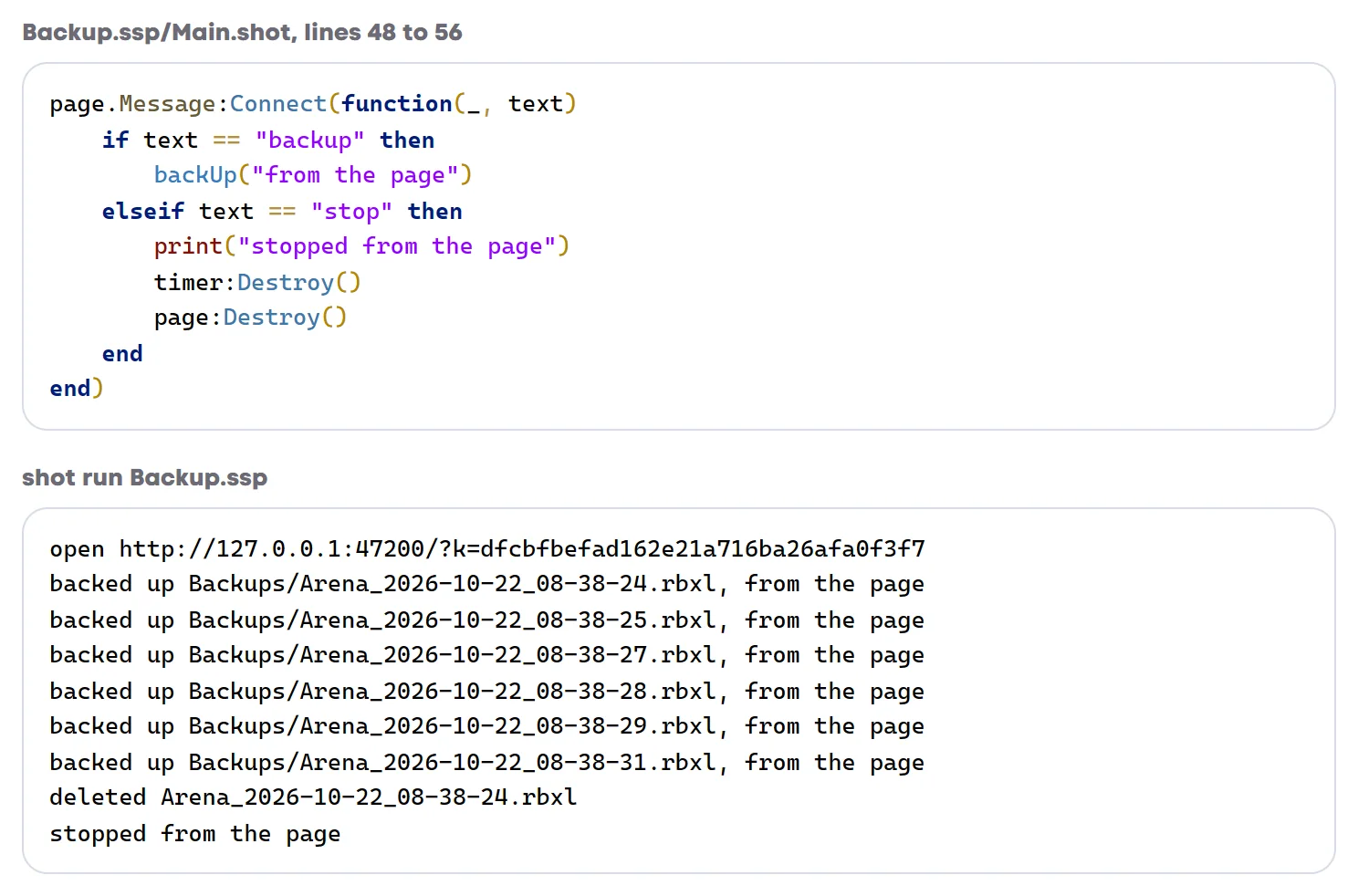
The sixth copy took the folder over five, so the oldest went. Stop destroys the timer and the page, and every open page hears its channel close when that happens. Ours turned its green dot grey:

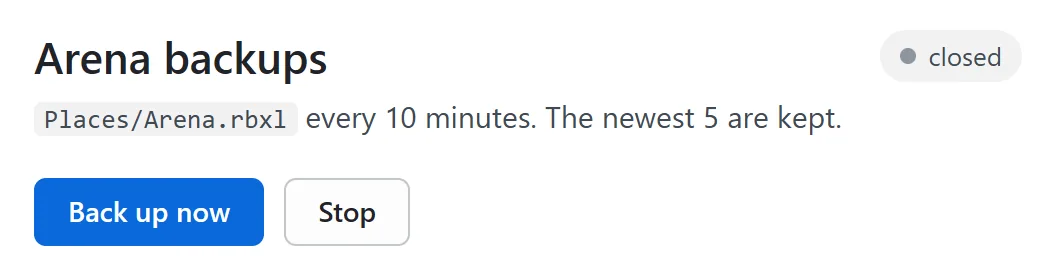
With the timer and the page both gone nothing was left running, so shot run ended by itself with exit code 0. There's no exit call anywhere in the program.
Checked like everything else
shot check reads every PageService call the way it reads any other service. The easiest mistake here is forgetting that a message arrives with the page that sent it. We wrote the handler with one parameter, function(text), and check said:
Backup.ssp/Main.shot:49:5   TypeError: Type PageClient cannot be compared with "backup"
Backup.ssp/Main.shot:51:9   TypeError: Type PageClient cannot be compared with "stop"
The first argument is a PageClient, and the text comes second. Without the check those two ifs would simply never be true, and both buttons would do nothing without an error anywhere.
Handing page:Send a table instead of text is caught too, with Expected this to be 'string', but got '{| Note: string |}'.
Your page and nobody else's
The address ends in ?k= and a key that changes every run. The page's files load without it, but the live channel only listens to a page that has it. We connected without the key and sent "stop", and the program ignored us and kept going. A page from another website doesn't get that far. Its connection is refused with refused: a request from the page http://example.com.
A program can also answer plain web requests with page:Handle, which is handy for your other tools. We added this route to the same program:
page:Handle("/backups", function()
	return { Body = report("asked by another tool"), Type = "application/json" }
end)
Asked without the key, it answered 401 and this route needs the page's key (X-Shot-Key, or ?k= from page.Url). With the key it sent back the JSON, which on that copy was {"Note":"asked by another tool","Rows":{}}, since no backups had been made there yet.