

 ShotScript
Add a value and find every match that needs it
A match in ShotScript branches on a string union, one case for each value. Add a value to the union and the ShotScript Editor marks every match that has no case for it. We tried it on parcels of three sizes, then four.
Three sizes
We worked in a place with a Shot folder in ReplicatedStorage, and gave it a Folder named Parcels. A ModuleScript in it named Sizes declares the sizes as a union and exports it:
system script

«How big a parcel is»
export type Size = "Small" | "Medium" | "Large"
Price gives every size a case of its own:
system script

import Size from script.Parent.Sizes

module Price = {
	function Of(size : Size) : number
		match size
			"Small" then return 3
			"Medium" then return 5
			"Large" then return 9
		end
	end
}

return Price
Label has a case for small parcels and an else for the rest:
system script

import Size from script.Parent.Sizes

module Label = {
	function Of(size : Size) : string
		match size
			"Small" then return "fits through the letterbox"
			else return "is left at the door"
		end
	end
}

return Label
Each one starts with system script, so each is a system of its own that other scripts can use by its path, and each imports Size from Sizes.
In ServerScriptService, a Boot Script named Server prices a small parcel and a large one:
-- Prices some parcels

use game.ReplicatedStorage.Shot.Parcels.Price
use game.ReplicatedStorage.Shot.Parcels.Label

print("A small parcel costs " .. Price.Of("Small") .. " and " .. Label.Of("Small"))
print("A large parcel costs " .. Price.Of("Large") .. " and " .. Label.Of("Large"))
The editor marked nothing. We ran the Luau the editor compiled, and it printed this:
A small parcel costs 3 and fits through the letterbox
A large parcel costs 9 and is left at the door
A fourth size
Then we added "Huge" to the union and changed nothing else:
system script

«How big a parcel is»
export type Size = "Small" | "Medium" | "Large" | "Huge"
The editor marked Price's match, on its match size line. The mark starts match on Size has no case for "Huge", names the line in Sizes that added it, and says what to do: add the case, or an else.
Label's match got no mark. Its else already takes the new size, so a huge parcel would be left at the door like a large one. That's right for Label, and it's also the thing to keep in mind: a match with an else never gets a mark, so a new value goes to the else without a word.
A case spelt wrong
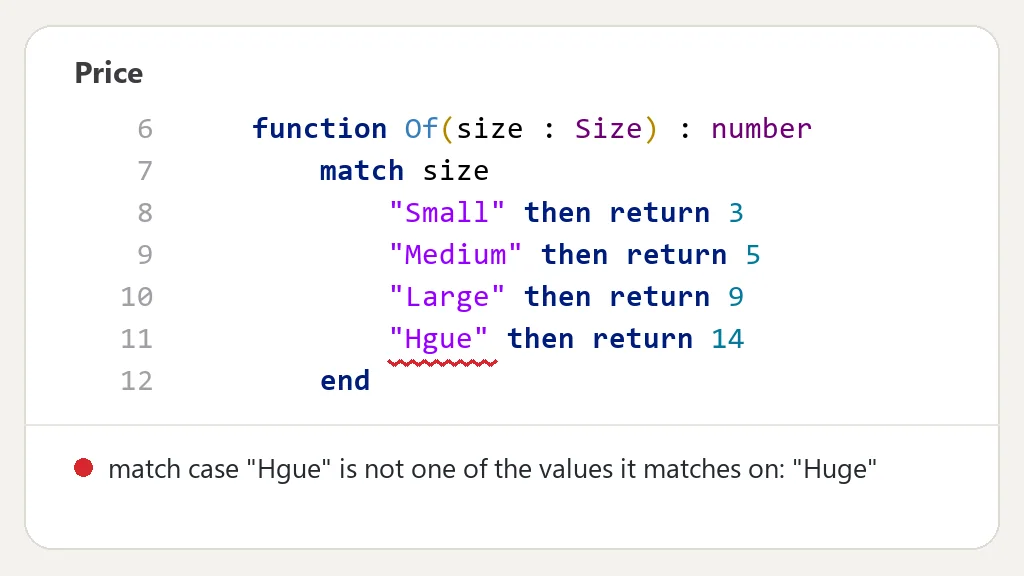
We gave Price its case and typed it "Hgue". The editor marked one line, the case itself, on line 11:
match case "Hgue" is not one of the values it matches on: "Huge"After the colon comes what it could have been: the values no case above it has taken. Here that's "Huge" alone, since the three cases above it take the rest. A case that matches nothing takes nothing, so the match is still missing a huge parcel. Its match size line gets no mark for that while a case is spelt wrong, since the case's own mark already names the value it's missing.
Spelt right
With the case spelt right and a third line in Server for a huge parcel, the mark went away:
system script

import Size from script.Parent.Sizes

module Price = {
	function Of(size : Size) : number
		match size
			"Small" then return 3
			"Medium" then return 5
			"Large" then return 9
			"Huge" then return 14
		end
	end
}

return Price
We ran it again, and it priced all three:
A small parcel costs 3 and fits through the letterbox
A large parcel costs 9 and is left at the door
A huge parcel costs 14 and is left at the door
A match with no else is the one the editor holds to every value, so a size added later gets a mark wherever it needs a case. An else fits when the rest of the values really do mean the same thing, as the door does for Label. The Match page has the rest, from a match on a plain string to what a match compiles to.