
Running and checking
shot check finds mistakes before anything runs, shot run plays the game outside Studio, and the editor's Run button does the same in its window.
You'll learn the loop you work in, what a scenario can do, and the editor's Run.
.shot files0 errorsShot check
One command checks everything, each at its .shot line and column: parse errors, ShotScript's rules (sides, events, match, start order, owned fields, rules, names in docs) and Luau's own type errors.
0 errors (16 files checked, 2.5 s)
0 errors (16 files checked, 0 s)
--only Walletreports only that folder's errors;--fastskips the type check, for the ShotScript rules alone.- With errors,
shot checkexits with 1, so a script or a build step can stop on it. - Notes (an event nothing hears, a bookmark of the wrong width) print under the errors and don't count.
Shot run
A Roblox project runs through its scenarios: Luau files in Scenarios/ that drive the real game code outside Studio. Name one, or several with commas:
==== summary
  Pickup         OK  (2 lines, 0 errors, 0.1s virtual)
  Vip            OK  (2 lines, 0 errors, 0.1s virtual)
  Buy            OK  (2 lines, 0 errors, 0.2s virtual)
  Given          OK  (3 lines, 0 errors, 0.1s virtual)
  History        OK  (3 lines, 0 errors, 0.2s virtual)
  Opened         OK  (3 lines, 0 errors, 0.1s virtual)
  Broke          OK  (2 lines, 0 errors, 0.2s virtual)
7 of 7 scenario(s) passed
(Each scenario's log follows that first summary, and the summary repeats at the end.)
An error in game code points at the .shot line, with the calls that led there. A scenario that calls Bank.Give(ana, nil):
-- Oops: Bank.Give with no amount, to see where a game error points.
return function(world)
	local Bank = world.Server.Require("Wallet.Bank")
	world:Boot()
	local ana = world:AddPlayer("Ana")
	world:Step(0.1)
	Bank.Give(ana, nil)
end
==== Oops
[client:Ana print] client started
---- scenario error
  [scenario] Wallet/Whole.shot:5: invalid argument #1 to 'floor' (number expected, got nil)
      Wallet/Whole.shot:5 function Whole
      Wallet/Bank.shot:28 function Give
      Scenarios/Oops.luau:7

==== summary
  Oops           FAILED  (1 lines, 1 errors, 0.1s virtual)
0 of 1 scenario(s) passed
Tip A scenario passes when it ends without an error, game code raised none, and every invariant held after every frame.
What a scenario can do
A scenario returns function(world). The calls this guide used:
world.Server.Require("Wallet.Bank"): a module by its dotted path underReplicatedStorage.Shot; a folder's entry point is the folder ("Stats").world:Boot(): runs every enabled server script, and every enabled client script for each client, now and for players who join later.world:AddPlayer("Ana"): returns the server's Player and that player's client;client.Require(...)reaches a module on it.world:Step(0.1): runs frames, so remotes are delivered and waits finish.world.Log(...),world.Logf(format, ...): a log line;world.Fmt(value)writes a value as stable text.
- The mock Roblox has instances, attributes, tags, server and client copies of the tree, remotes, Players, RunService, DataStoreService in memory,
task.*and virtual time. - It has no physics, rendering, GUIs or character movement. The comments at a scenario's top are its summary, and
Scenariosnever ships.
System projects and the editor
A System project has a program of its own, and shot run runs it: shot run Hello.ssp printed Hello from Hello on page 1. shot open Hello.ssp opens it in the editor's window:
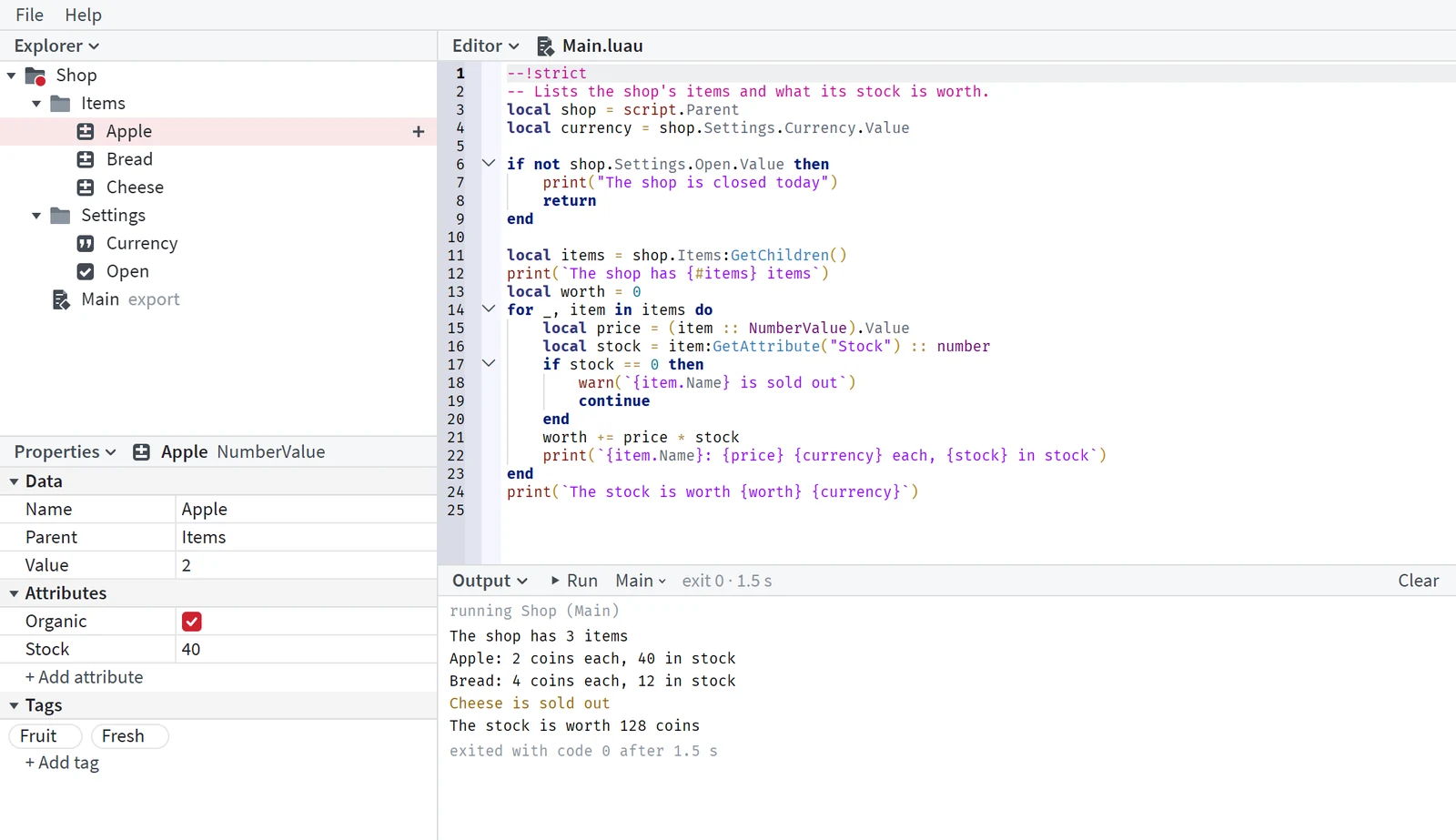
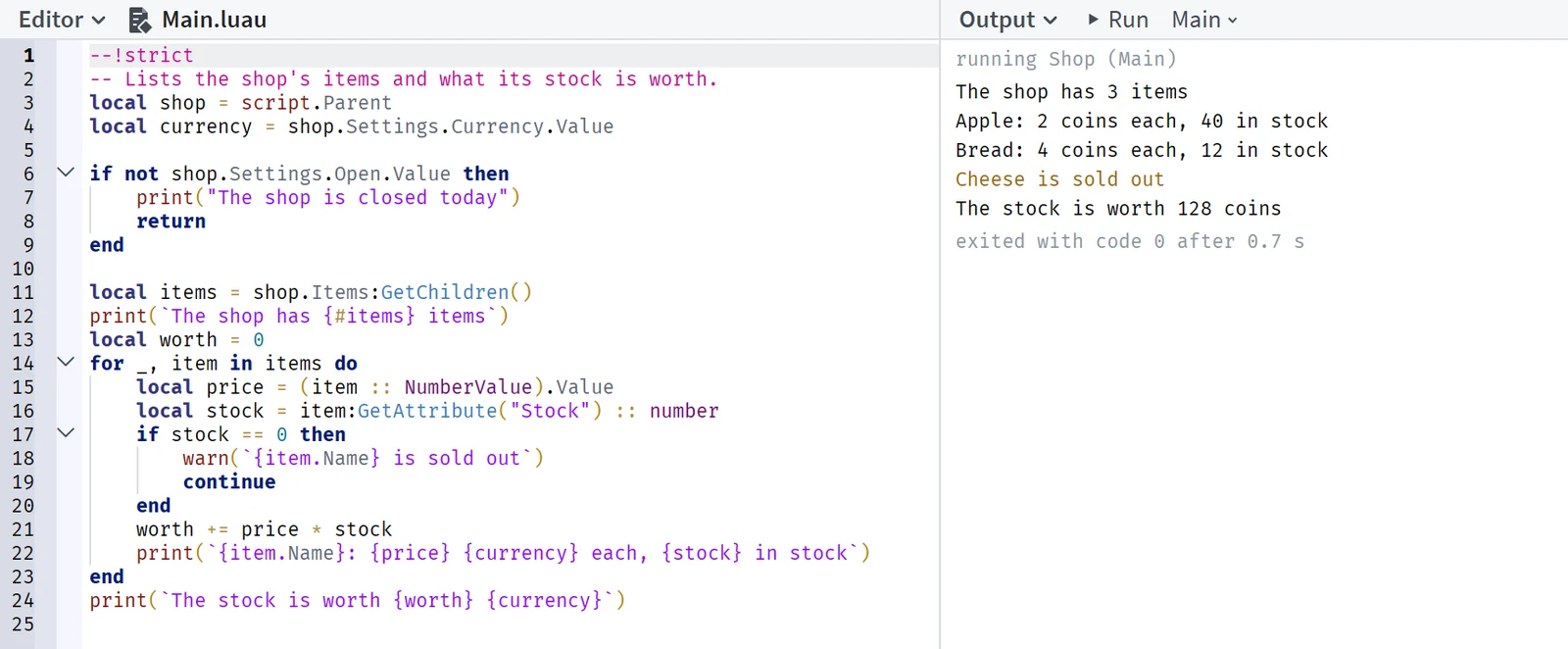
- Run, or F5, runs the project: what it prints, warns and errors shows in the Output as it happens, and an error opens its line.
- The menu beside Run picks what runs: the program or a scenario.
- Stop, or Shift+F5, ends the run and everything it started.
Tip The window shows the Explorer, Properties, Editor and Output in full.
Write Scenarios/Twice.luau, where Ana gets 10 coins twice and the scenario asserts she has 20, then run it with another: shot run Pickup,Twice.