

 ShotScript
 Stroke Engine
Extends blocks, steadier tabs, Docs that stays put and ModelScatter
Here is everything that went live on Friday, 20 November: extends blocks and sharper type checks in the ShotScript language, a new ShotScript Editor with steadier tabs, a Docs that keeps its page and many typing fixes, and new tools and looks in Stroke Engine. Extends blocks come first: they add members to one of your classes or modules from outside its body, even from another script of its system.
Extends blocks
extends X { ... }adds members to X, one of your classes or modules, from outside its body.- Below X in its own script,
extends X { ... }works like writing members in X's body. Above X, a fix moves it below. - An extends head takes
extends X {,extends X = {or X's own list. Any other head is flagged, and its fix writes X's list. - A plain
extends Locales { ... }, below the module or in another script of its system, adds members as if written in its body. - X's own script reads the members its extension scripts add, typed and checked as anywhere else: in a module's own script,
module.Doubled(1)calls aDoubledthat an extension script adds. - When X changes, a script extending it is checked again, so its problems stay true, even when X turns from a class into a module.
- An extension script's member keeps its class's override rules and promises. Hover, Go to Declaration and Find Usages name what it overrides.
- A class table is frozen once its setup ends: at its
}line, or at its lastextends X { },client extends X { }orserver extends X { }block in X's own script. After that,Icon.Speed = 20errors when it runs: "attempt to modify a readonly table". Objects stay writable.
Tabs keep to their own script
- Opening a script never takes over a tab another script used. Each tab shows and writes only its own script, after a rename, after you close a tab and open another, and when Studio opens again.
- When ShotScript Editor updates itself, every tab stays open and keeps writing into its own script, even in a place you opened several times.
- A tab always shows its own script's name and icon, and a renamed script gets its new name on its tab.
- A tab you close by its x stays closed and doesn't come back the next time ShotScript Editor starts. A tab you closed and opened again comes back with the rest of your tabs.
- In a place with no scripts, tabs left over from scripts that no longer exist close as soon as the place loads.
- While your tabs come back after Studio starts, no other tab shows in front of the one you left in front, not even briefly. Click into Studio's command bar meanwhile, and the keys you type stay there.
- With a ShotScript tab docked at a side, Studio's title bar names the script in the middle, unless the side tab has the keyboard.
- Before any change reaches a script, ShotScript Editor keeps its old text on your computer, so earlier versions of your scripts are kept.
Typing and checking
- The completion list answers your newest typing. After the
:on a field's line, it offers type names. - A field you type lines up with its neighbours in a scope's table block or a class: its
:and=fall in their columns. At 200% display scale, colons and equals signs lined up with tabs sit in one column, as they do at 100%. - In a class implementing an interface, Enter on a promised member's completion writes its whole stub with the caret inside, and one Ctrl+Z undoes it.
- While you type a script that doesn't compile yet, its tab no longer shows a Not compiled line. The underline and the Problems list stay.
- When a script can't compile, its red underline stays until it compiles again, and an older check never leaves a stale error in Problems.
- If a ShotScript script doesn't compile when you press Play on Studio's toolbar, F5 or F8, a box titled Compile before Play asks "Play anyway?" before Play starts. Cancel doesn't start it.
- When a name has several declarations, Go to Declaration lists them all, and Find Usages on an override lists its interface promise's line too.
- The signature card lists a call's fields the way the hover card does: one per line with their icons, colons lined up and each field's doc beside it.
keys ofandtags oftake the same colours on every set line as on a system set line, and a scope written on one line colours its members as it would on lines of their own.- In a Luau script's tab, one Undo takes back one line you typed, even when the line reached the script while you were typing.
Docs stays on its page
- Docs keeps the page it shows when you pick another script in ShotScript Explorer or bring another tab to the front.
- As the caret moves in the script Docs shows, Docs highlights the member it's in and scrolls to it, waiting two seconds after you scroll.
- In a ShotScript tab, the right-click menu on a type's name can open that type's own page in Docs, for a type another script declares.
- Clicking a box on the System Map, even with Ctrl or the middle button, opens its Docs page in one tab only.
- Ctrl+wheel, Ctrl+=, Ctrl+- and Ctrl+0 zoom Docs by the same amounts as Studio's script editor, with every column lined up at each zoom.
- The Exports bar lists names with their kind's icon, and a click scrolls to the member, which flashes. An empty page says "No members yet."
- On a type's page, an inherited member that overrides one further up stays under its From bar, and hovering it names the type it overrides.
- A system's page opens with its own header.
Easier to read
- In the light theme, doc text is drawn darker.
- Code in a doc takes the doc's dim ink and size, so a doc line with code is no taller than one without. A doc of several paragraphs shows in the dim doc ink beside its member, or under it when Docs is narrow.
- A first parameter or field sits right under its head, each record's fields share their own colon column, and a long doc on a record's head shows whole under its closing brace.
=and= {never leave the name's line, and kind words show dim after the name.- Only an entry too long for its line puts its type under its name, and a short set stays on one line. An entry too wide to line up with the others sits tight instead.
- A set option never splits: one too long is cut whole with an ellipsis. A union's head doc leaves no empty line.
- A wrapped return type continues under the parameters, and an empty scope shows no bar.
- Emoji, Japanese and Chinese docs stay inside their column, and an overload without a doc keeps its tag right after its code.
- In a very narrow Docs, titles, members and bar heads stay on one line, cut short with …, and the page never scrolls sideways. A sidebar entry that's too narrow drops its dim kind word before it cuts the name; hover it to see both whole.
Panels and docks
- Hover a script in ShotScript Explorer to see the same hover card a ShotScript tab shows. It never takes the keyboard or the selection.
- A side panel you close with its x, floating or docked, stays closed when you open that place again.
- Reopening Problems with its button brings it back at the width you gave it. A side panel shown into an area already full of panels keeps the size you gave it instead of shrinking.
- Docked at a side of Studio, System Map has a title bar to drag it out by, kept after hiding it or restarting Studio.
- Docks that share tabs, like ShotScript Explorer and ShotScript Properties, keep the order you left them in after hiding one or restarting Studio.
- A dock you put beside the middle of the window comes back on that side when you reopen the place, never across the top.
- At 200% display scale, Find in Place floats and drags like the other docks.
- When a Studio still runs the older add-on after an update, ShotScript Explorer, Properties and Problems say: "Restart this Studio to finish the update."
Classes and types
- An override with no word keeps the reach of the member it overrides, so one over an inherited internal member stays internal to the system that declared it.
publicon such an override is an error at that word (an override keeps <Member>'s reach: internal to <System>), and its fix, Drop public, takes the word out. - An abstract field narrows in a child: over
abstract internal _attached : FormatBase, a child'soverride internal _attached : FormatItemTextgives it a type that fits the parent's. The child readsself._attached.Alignwith that type, while the base, and any value typed as the base, readsFormatBase. - A field not set on every path is flagged on the
{}orinit()that makes the object, naming the fields and where it leaves. - A call written without brackets is made as its bracketed call:
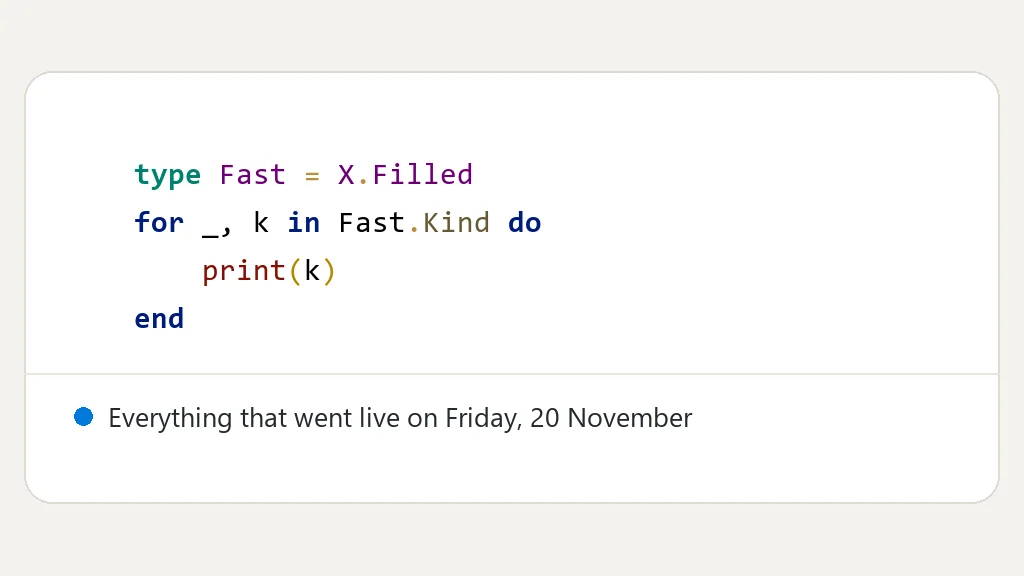
init{}isinit({}), and so aresuper:Name{ ... }andX.Name{ ... }. scope Faster extends X.Filledreads through the nested scope, and hover names what Faster inherits.type Fast = X.Fillednames the scope, so its sets read as values, as infor _, k in Fast.Kind do. The oldtypescope Fast = X.Filledgets one warning sayingtypenames the scope, and its fix, Write type, rewrites the line.- Inside
class Parser<T : TokenizerTypes>, a bareUnfilled<...>gives no error and reads asT.Unfilled. - A subclass that fills T reads T's names bare in its body, and completion offers them: in
RichParser extends Parser<T = RichTypes>,Propertiesis RichTypes'. Another system that reads such a type gets its fields with their types, even fields typed by names the type's own system doesn't export. - A check on a field's tag narrows the record holding it: after
if slot.Item.Kind == "Stack",slotfits its Stack shape without a cast. - When a test joined with
andfails, either side may have failed, so theelseiforelsebelow it narrows nothing from it. for _, propertyName : PropertyName in PropertyName doreads as it does without the type. Any other type makes a plain loop that fills nothing.- A table keyed by a narrower set fits where
{ [WorldId] : SunLightingMode }is wanted.{ each WorldId : SunLightingMode }needs every member. - A guillemet doc on a system set line shows on that set in Docs and in the hover on its name.
The shot command
shot rename <file>:<line>:<col> <New>renames the local, parameter or loop variable at that spot and every use in its scope. A taken name or a keyword is refused, a spot on a member points you toshot rename <Name.Member> <New>, and a spot on a global is refused.shot doc <Type>lists every field of a type, its own first, then the ones it inherits from a record joined with+or from a class's parent, each tagged with the type it comes from and its line.
Stroke Engine
- ModelScatter spreads copies of whole objects over terrain or a part.
- Spilled liquid can settle into a thin film on the floor.
- Revolve builds a round glass, bottle or vase from a photo or an outline, and adds arched facets, rounded rims and a turn.
- Murky water now glows where the sun reaches into it.
- Age it now draws uneven dark joints, moss in clumps and layered rust with streaks.