

 ShotScript
Write your game's rules down, and ShotScript checks them
Some of the worst bugs in a Roblox game never print anything. A daily quest adds coins straight to a player's purse, and the coin count on the player list stops matching what they have. Someone changes how pets are saved, and everyone who played before the update loads a save the new code reads wrong. Nothing errors. You hear about it from players.
Last week ShotScript got a way to write rules like these down. Each one is a line or two in a system's Types.shot, and none of them adds code to the game. They give shot check and shot run something to hold every other script to.
We tried them on a small pet game with four systems. Coins keeps every player's purse, Leaderboard shows coins on the player list, Quests pays daily rewards and Eggs hatches pets. Every message below is what shot printed for that project.
Only Coins changes coins
In our game coins go through one function. CoinsServer.Grant stops a purse at 1,000 coins and publishes an event the leaderboard listens to, and a quest that sets coins itself skips both. So the Coins system says so in its Types.shot:
doc { Grant keeps a purse under the cap and updates the coin count on the player list; a write to Coins does neither }
owns Purse.Coins via CoinsServer.Grant
Then we wrote the quest reward the quick way, and shot check stopped it at the line:

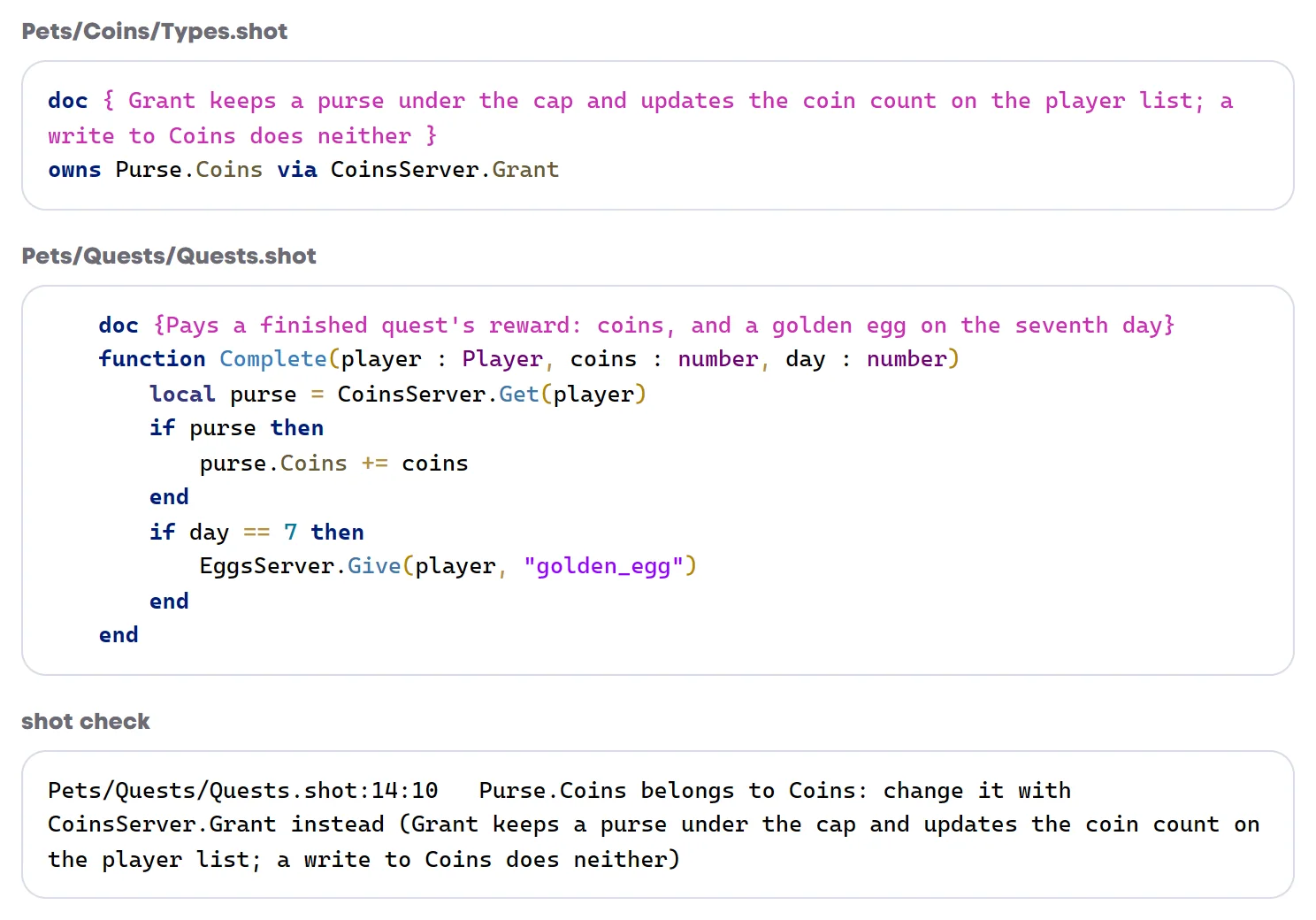
The part in brackets is the doc from the owns line. Whoever runs into the rule months from now reads why it's there, so write that doc for them.
Code inside the Coins folder can still write the field, since that's where Grant and Spend live. Everywhere else the check catches =, += and the other compound writes, writes to entries when the field is a table, and table.insert and the other table calls on it.
Who sends an event
That event is declared in the same file:
event CoinsGiven(player : Player, amount : number)Every publish and every listener is checked against that line. The event belongs to Coins, so only files in Coins publish it. We added a publish to the quest anyway, right after the Grant, the kind of line someone adds to "make sure the leaderboard hears about it":
CoinsServer.Grant(player, coins)
CoinsGiven.Publish(player, coins)
Pets/Quests/Quests.shot:13:3 CoinsGiven is Coins's event (Coins/Types.shot:4): only files in Coins publish itTo see what it would have done, we played our week of quests on it anyway. shot run plays scenarios in a mock Roblox, with no Studio open, and this one finishes seven quests of 120 coins for a player called Alice:
Alice has 840 coins and the player list shows 1680Grant had already published the event, so the leaderboard counted every reward twice. When a second system really should publish an event, you add it to the line with published by Coins, Quests, and the check passes.
A rule checked after every frame
Owning a field says who may write it. Some rules are about what has to stay true no matter who writes. In our game a purse never holds less than 0 or more than 1,000 coins, so that goes into Types.shot too:
doc { A purse never holds less than 0 or more than MAX_COINS: Grant stops at the cap and Spend refuses what is not there }
invariant CoinsServer.CoinsInRange
CoinsInRange is a plain function in CoinsServer. It loops over the purses and returns false, with a short message, when one is out of range. Nothing in the game calls it. shot run calls it after every frame of every scenario it plays.
Then a weekend bonus went into CoinsServer itself:
function WeekendBonus(player : Player)
	local purse = purseOf(player)
	purse.Coins += 900
end
It lives inside Coins, so the owns line lets it through, and shot check printed 0 errors. Our Weekend scenario plays the week of quests and then the bonus.

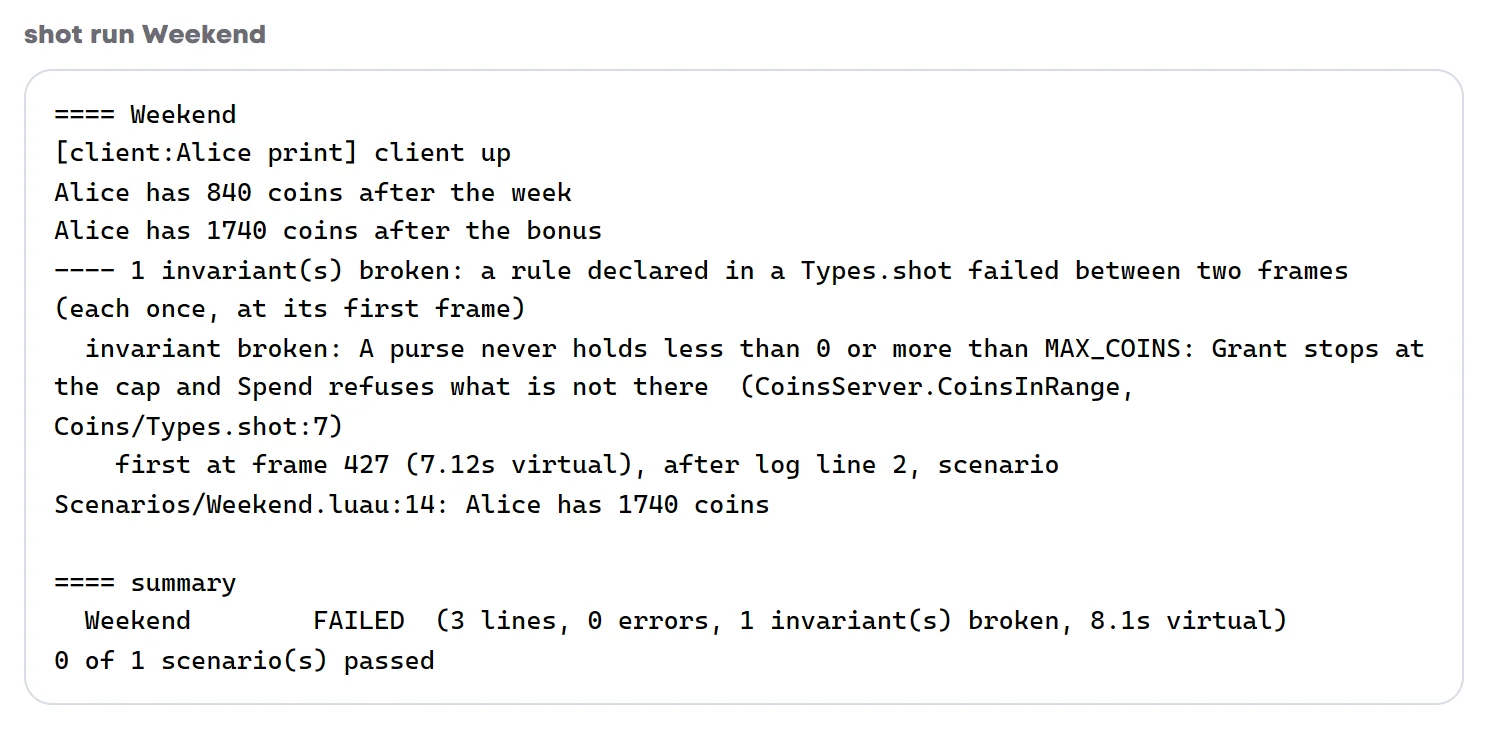
The report gives the rule in your own words, the first frame that broke it (frame 427, seven seconds into the scenario), the scenario line that ran that frame, and what the function said was wrong. We took the invariant line out and ran it again. Same two log lines, and the scenario passed. That's how a bug like this usually gets shipped.
A rule only reads. shot check refuses one that writes to anything but its own locals, fires a signal or waits, because it runs between the frames of the game it's checking.
Saves that old players can still load
This one loses data. Eggs saves how many eggs a player has hatched and a list of their pets:
public type EggsSave = {
	Hatched : number,
	Pets : {string},
}
When a version ships, you run shot savelock, and it writes the shape of every saved section into Saved.lock, a text file at the project root. A month later we wanted counts instead of a list, Pets : {[string] : number}. It's a two-line change and the code is fine. The save it breaks is the one already sitting in a player's data store.

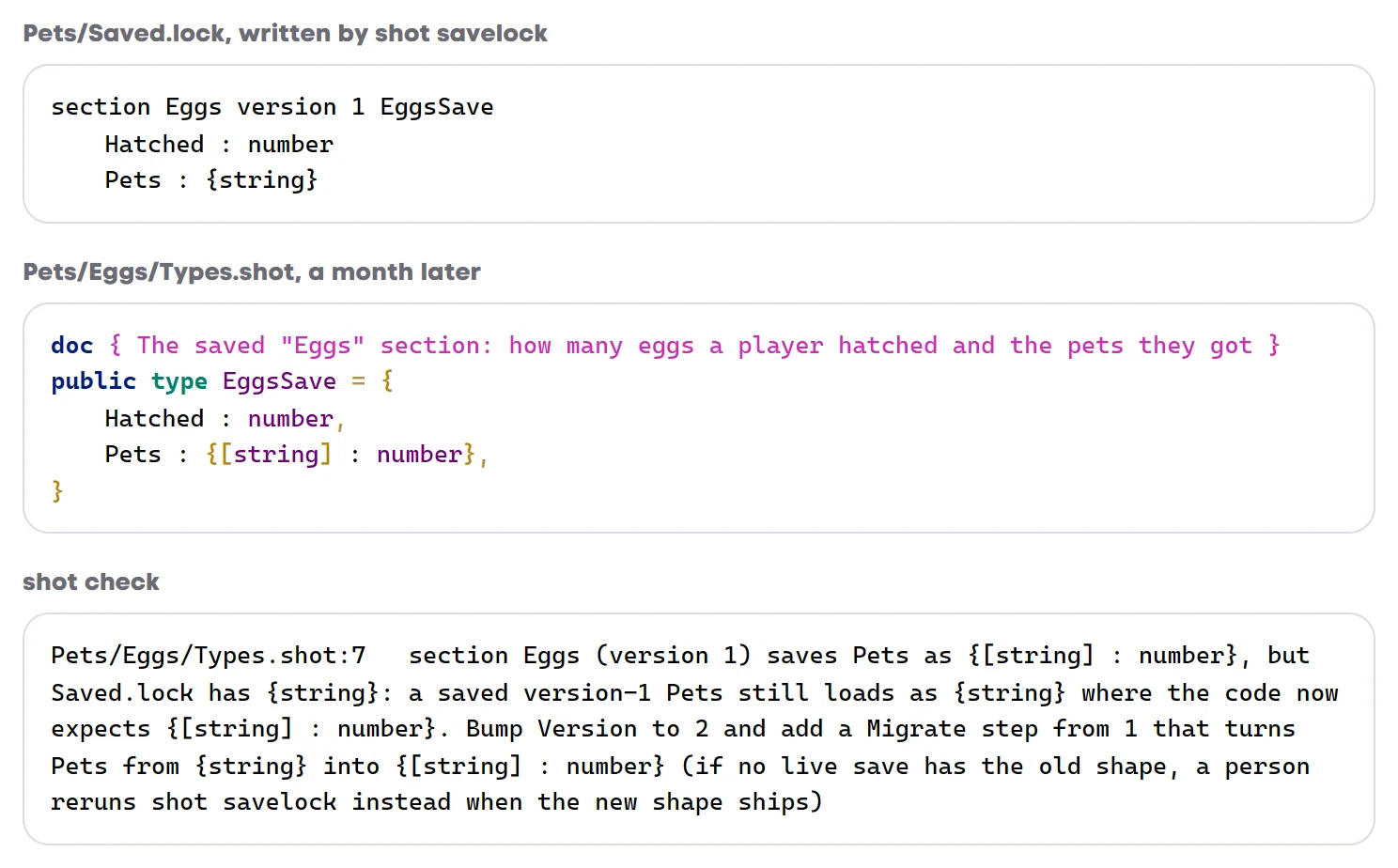
Bump the Version without a Migrate step and the check names the step that's missing. So we wrote one:
local function migrate(old : any, fromVersion : number) : any
	if fromVersion == 1 then
		local counts : {[string] : number} = {}
		for _, pet in old.Pets do
			counts[pet] = (counts[pet] or 0) + 1
		end
		return { Hatched = old.Hatched, Pets = counts }
	end
	return old
end
With Version = 2 and Migrate = migrate in the section, the check passes. The next shot savelock puts version 2 in the file and keeps version 1 below it.
It reads what a step gives back, too. A step that returns { Pets = {} } and forgets the hatch count gets this:
Pets/Eggs/EggsServer.shot:19 section Eggs: the Migrate step from 1 returns no Hatched, so a version-1 save loads with Hatched nil where version 2 expects number; add Hatched = 0 (as Default has it) to that returnshot check never updates the lock for you. Only you know which saves are out there, so you run shot savelock yourself when a version ships.
Ids you can't misspell
Last one, and it's small. id PetEgg in Eggs/Types.shot makes a kind of string id. To Luau it's still a string. The ids are the PetEgg strings the Eggs system itself writes, so there's no separate list to keep up to date. Anywhere else, a typo is an error that names the real id:
Pets/Quests/Quests.shot:14:28 "goldn_egg" is not a PetEgg (nearest: "golden_egg"): the ids are the PetEgg literals in Eggs; shot ids PetEgg lists themshot ids PetEgg lists every id, where Eggs defines it, and every use outside Eggs.
A project that declares none of these checks and runs the same as before, so you can add them one at a time, starting with the field that bit you last.