
Projects
Nothing gets lost. Every save keeps the one it replaced, and a crash hands your changes back.
A project is one .stroke file; the top bar says Saved when a save is done. Autosave keeps a working copy after real edits, never for playback, scrubbing or Play. Older project files open too.
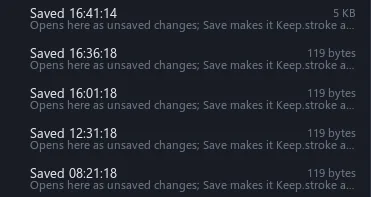

Go back in time
Changed your mind? Open an earlier save.
File > Open previous version lists up to five older saves and the autosaves. After a crash you pick the unsaved changes or the saved file, and the other is kept. If another window saved the file meanwhile, Save asks first.
Undo anything
Undo a closed window as easily as a moved part.
Edits and window changes share one undo history, kept across restarts. Run several Stroke Engine windows at once; copy and paste between them brings the images and meshes too.