
Rendering
Work fast in Solid, then flip one switch and the whole project is path traced, with bounced light, soft shadows and glass.
A camera's picture is drawn in one of two modes: Solid, a fast rasterized preview, or Rendered, a path tracer. One switch sets the mode for the whole project: the Rendered / Solid control in the top bar, ShiftZ, or Root.RenderMode in a script.

Two keys
Dial in the look
Every camera has its own look: how clean, how bright, how sharp. Add depth of field, motion blur and bloom, or write your own shader and it gets traced too.
Most settings belong to each Camera; the sky, the sun and the background colour belong to the DataModel it draws. Passes are extra pictures of the same view, such as depth or normals, made with AOV instances. A Shader instance draws your own GLSL in both modes.
| Camera | Samples, Bounces, Noise Threshold, Exposure, Force Solid |
| Denoise | Off, Smooth, Detail; Lens Denoise |
| Noise | Dither, Firefly Clamp, Pixel Filter, Sample Pattern |
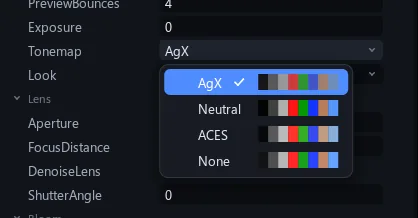
| Look | Tonemap AgX, Neutral, ACES, None; Look None, Punchy, Punchy Soft |
| Lens | Field of View or Orthographic; Aperture, Focus Distance; Shutter Angle |
| Bloom | Intensity, Size, Threshold, HDR |
| Ambient occlusion | Radius, Intensity (Solid) |
| Sky | Top, Horizon, Ground colours; a panorama; the sun; CloudSky |
| Background | Transparent, kept in the WebM master |
| Passes | Mask, ObjectId, Depth, Normal, Albedo, Emission, Position |
| Shader | Your GLSL, attributes as uniforms, traced too |
Smooth while you preview
Drop the preview to a quarter size while you work; your renders stay full size and traced.
View > Preview Res draws every picture at 100% down to 25% while previewing; renders and saved images stay at 100%. View > Playing picks Clean frames, which finishes each frame's first pass during playback, or Smoothest fps. A viewport's Res menu has Max quality for the best picture in that viewport. Final renders are path traced whatever the switch says, except through a camera with Force Solid on.