
Audio and VST3
Mix your sound where you cut your picture. Lay clips on the timeline, chain effects as nodes and play your own VST3 plugins.
A sound clip's card in the Nodes window wires through effects into the AudioOutput; every effect slider can be keyed or wired.
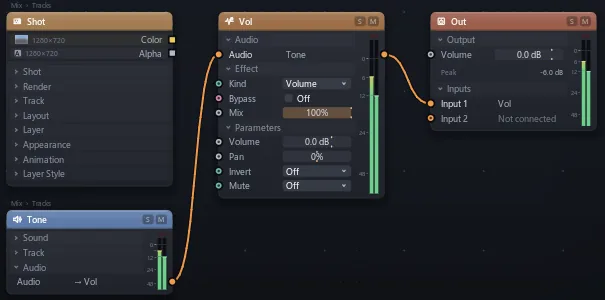
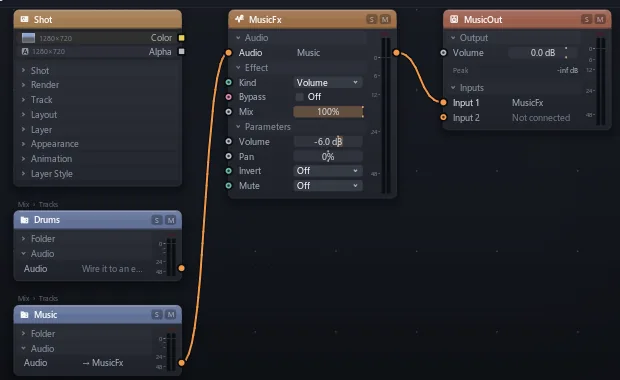

Wire up the mix
Put a whole drum kit through one reverb, or let a beat's loudness drive a glow.
A SoundFolder has one card for the mix of every clip inside, and Loudness turns sound into a number for any other input.
| Utility | Volume, Stereo Imager |
| EQ | EQ |
| Dynamics | Compressor, Limiter, Gate, Multiband Compressor, Transient Shaper, Clipper |
| Colour | Saturator, Filter |
| Space | Reverb, Delay, Ambience, 3D Player |
| Modulation | Chorus, Flanger, Phaser, Tremolo |
| Distortion | Distortion, Bitcrusher |
| Generators | Sine, Saw, Square, Triangle, Noise, LFO |
| Math | Add, Subtract, Multiply, Divide, Min, Max, Abs, Clamp, Tanh, Sin, Power, Mix |
| Measure | Loudness, Waveform, Spectrum |
| Plugins | Any 64-bit VST3 effect or instrument |
Bring your plugins
Use the VST3 effects you own, and play your synths from notes on the timeline.
Nodes > Add > Audio > Plugins scans them the first time; right-click a card > Open plugin window. Instruments play Cook note clips. A plugin's state is saved in the project, renders sound like playback, and one that hangs never freezes the app.