
A camera shot
Two cameras, one slow push-in, one cut: the shot is a row on the video's timeline, and changing camera is a click.
In development, not released yet.
You'll learncameras, looking through one, a keyed push-in, camera shots and a cut.
Two cameras
A Camera is an object in the scene, and a viewport can look through it. A new camera starts at the view you are in and copies that camera's look.
- In the picker at the left of the viewport header, pick Camera.
- Select Studio, then in the top bar Insert > 3D > Camera.
- Rename it ShotCam (F2).
- Insert one more the same way and name it CloseCam.
Frame them
Flying while you look through a camera leaves the camera where it is. Turn on Move camera with view and it flies with you.
You know this asBlenderLock Camera to View
- In the picker, pick ShotCam, then Move camera with view.
- Fly to a wide, low view of the pedestal.
- Pick CloseCam (Move camera with view stays on) and fly close to the Statue.
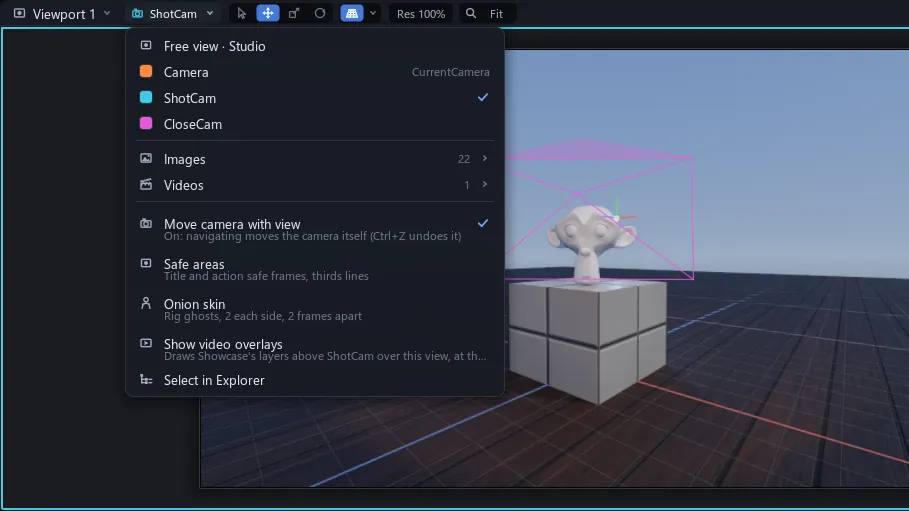
Numpad 0 looks through the selected camera, and back to the free view.
Push in
- Pick ShotCam in the picker again, and select it in Explorer.
- Click Cook and press ShiftLeft until the playhead is at 0 s.
- In Properties, point at CFrame and press I.
- Click Cook and press ShiftRight nine times: the playhead is at 3 s.
- Fly a little closer to the Statue: the key at 3 s makes itself.
Once CFrame has a key, flying with Move camera with view on keys it at the playhead by itself; an extra I does no harm. Both keys ease, so the push starts gently and settles.
Cut to the close camera
Showcase is a CookVideo: a timeline that is also a picture. Whatever sits under the playhead is drawn, the top row on top.
You know this asAfter Effectscomposition, but films scenes
Its SHOT row films the scene through one camera at a time. Each part takes its camera from the chip at the row's right end: the camera's name and ▾, beside From view.
You know this asBlenderBind Camera to Markers
- In Cook, click the SHOT row's camera chip and pick ShotCam.
- At 3 s still, click the shot's bar and press S to split it.
- Without moving the playhead, click the camera chip again and pick CloseCam.
- In the viewport's picker, pick Videos > Showcase, then press Space.
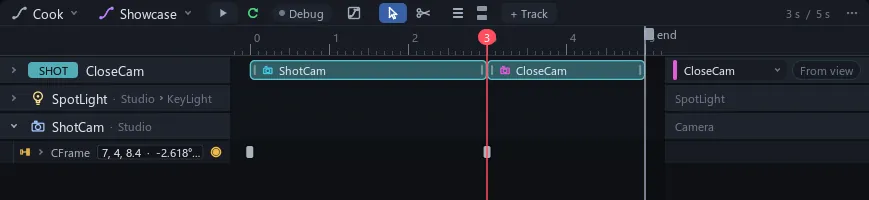
A project can hold many videos of one scene: File > New video makes another, with its own shot.
Tip To aim a camera without flying it, right-click it in Explorer > Set camera from view. It takes the viewport's view as one undo step.