
A script layer
Draw a layer with code. A script layer gets the video's time on every frame inside its clip, and whatever it draws is stacked into the shot.
In development, not released yet.
You'll learna ScriptTrack, function(time), In and Out, how layers stack, a title that fades in
Add the layer
A script layer is a ScriptTrack: a ModuleScript that returns function(time), and a picture the size of the video for that function to draw.
- In Explorer, double-click Showcase to open it in Cook.
- Put the playhead where the title starts, say at 1 s.
- Right-click anywhere in Cook > Add script layer.
- The new layer, Track, is selected: press F2, type Title, press Enter.
- Double-click the layer's bar to open its script.
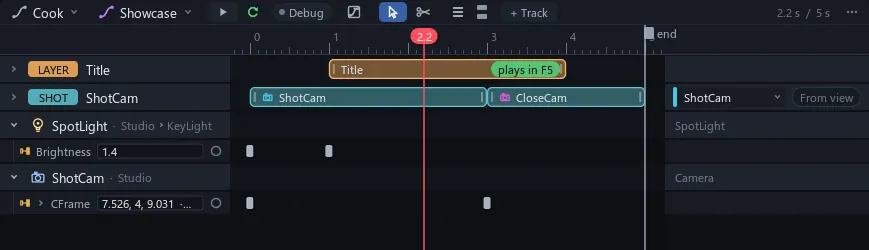
The new layer starts at the playhead, runs 3 seconds and goes on top of the stack. Drag its bar to move it, or one end to trim it.
You know this asAfter EffectsIn and Out points
Write the title
-- Title: a script layer. Stroke calls the function below once a
-- frame while the playhead is between this layer's In and Out.
local words = Instance.new("TextTrack")
words.Text = "PEDESTAL"
words.TextSize = 72
words.AnchorPoint = Vector2.new(0.5, 0.5)
words.Position = Vector2.new(script.Size.X / 2, script.Size.Y * 0.8)
words.Parent = script

return function(time)
	local fade = math.clamp((time - script.InPoint) / 1.5, 0, 1)
	fade = fade * fade * (3 - 2 * fade)
	words.Transparency = 1 - fade
	script:Clear()
	words:DrawOnto(script)
end
The top runs once, when Play starts, and makes the words: a TextTrack kept inside Title, not a layer of its own. The returned function is the layer: each call eases the words in, clears its picture and draws them onto it.
Watch it fade
- Press F5 to play.
- Click Cook and press Space to run the timeline.
 BeforeAfter
On every frame Stroke runs Heartbeat, calls each script layer whose In and Out hold the playhead, then stacks the layers, top row on top. Outside its clip, Title isn't called or drawn. If its function errors, the layer sits that frame out, its row shows a red !, and Output says why once.
Watch out Edit runs no scripts: the Title clip shows a green "plays in F5" badge at its right end, and the viewport shows its last Play picture, or marks its box. Renders run it as Play does.
Tip Any layer can also fade in with no code: in Properties, under Animation, set InAnimation to Fade (or Slide, Pop, Typewriter, Wipe).
Try it Change 1.5 to 0.5 for a quicker fade, or set words.Text to your product's name.