
Sandboxes and InitScripts
Let a script build part of the shot. Press Play and an InitScript lays a ring of glowing orbs around the pedestal; press Stop and every orb is gone.
In development, not released yet.
You'll learna Sandbox, its InitScript, what Play makes and what Stop puts back
A scope for scripts
A Sandbox is a folder whose scripts get a Luau VM of their own. Its InitScripts run when you press F5, and ShiftF5 puts back whatever they changed.
You know this asRoblox StudioActor
- Check that the picker in the Explorer header reads Root.
- Right-click an empty spot below the rows > Insert > All > More > Sandbox.
- Press F2, type Orbs and press Enter.
- At the right of the Explorer header, click the eye > Internal instances.
- Double-click Init inside Orbs to open it in Script.
A new Sandbox brings an InitScript called Init, plus a Scene and a Viewport image of its own. The ring goes into your Studio scene instead, so only Init matters here. Keep Orbs out of Studio: a Sandbox inside a scene doesn't run.
Lay out the ring
Replace the code in Init with this. It runs once, when Play starts: it makes one glowing TexturePack, then twelve balls in a circle around Pedestal, level with its top.
You know this asRoblox StudioScript
-- Orbs: a ring of glowing orbs around the pedestal.
-- Runs once when Play starts; Stop takes it all back.
local studio = Root.Studio
local pedestal = studio.Pedestal
local center = pedestal.Position + Vector3.new(0, pedestal.Size.Y / 2 + 0.5, 0)

local count = 12
local radius = 6

local glow = Instance.new("TexturePack", script.Parent)
glow.Name = "Glow"
glow.EmissionValue = 10

for i = 1, count do
	local angle = i / count * math.pi * 2
	local orb = Instance.new("Part")
	orb.Name = "Orb" .. i
	orb.Shape = Enum.PartType.Ball
	orb.Size = Vector3.new(0.6, 0.6, 0.6)
	orb.Color = Color3.new(1, 0.75, 0.4)
	orb.TexturePack = glow
	local offset = Vector3.new(math.cos(angle), 0, math.sin(angle)) * radius
	orb.CFrame = CFrame.new(center + offset)
	orb.Parent = studio
end
Watch out In a Sandbox, workspace is the Sandbox's own first scene, not yours. That's why the script names Root.Studio.
Play, then Stop
- Press F5: the ring appears.
- Hover the icon of Orbs in Explorer: it reads Scripts running.
- While it plays, change Floor's Color in Properties.
- Press ShiftF5: the orbs are gone, and Floor keeps its new colour.
Playing Orbs
Stopped
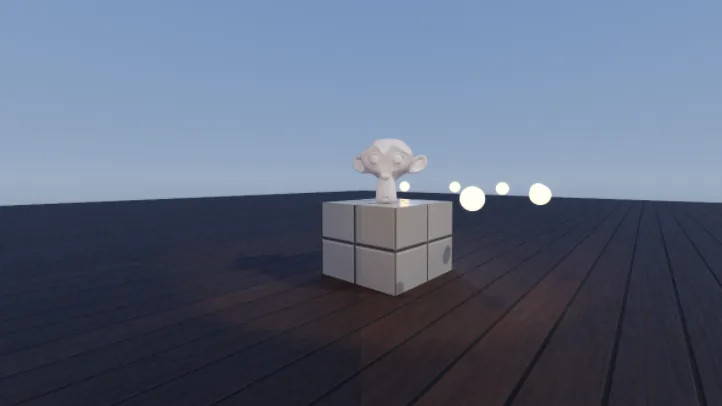 BeforeAfter
Stop takes back only what the scripts did: what they made goes, values they wrote return, and values you set yourself stay. Output says what Play started and, when scripts wrote values, how many Stop put back.
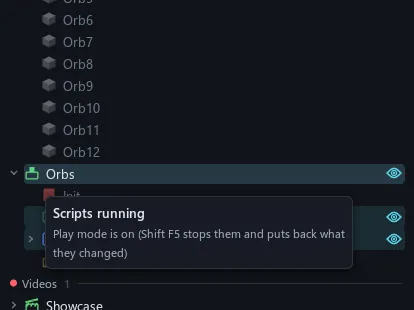
Hover the icon of Orbs to read whether its scripts run: Scripts running, Scripts stopped, or Script error (the icon turns amber).
Try it Set count to 24 and radius to 8, then press F5 again.